 Solid Toolkit
Free: printable monthly budget worksheet
Two pages. Plan vs actual, bills, savings goals and a TFSA, RRSP and FHSA room box.
Kits / Canadian Monthly Budget Planner
A monthly budget planner for Canada, for you or your household. Plan each month, see where your money went, and keep an eye on your TFSA, RRSP and FHSA room, all in one spreadsheet. A planning tool, not tax advice.
CA$15One-time price. Instant ZIP download, with our 14-day promise. The kit files use official government pages checked October 24, 2026.
What you download: A spreadsheet workbook (.xlsx), a filled-in sample copy, an 8-page PDF guide and a README. Formulas only, no macros.
Not ready to buy? Get the free printable monthly budget worksheet first. CA$0, instant download.
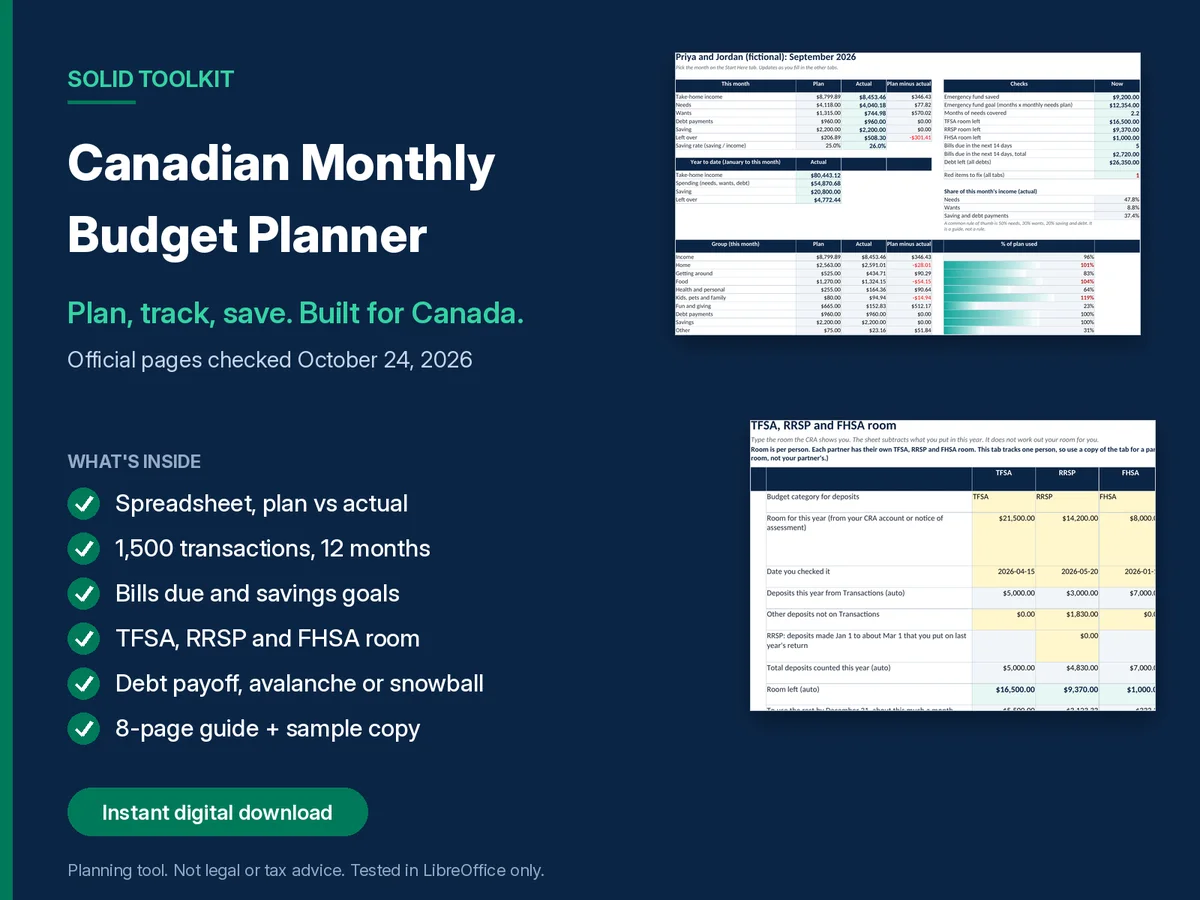
In short: This spreadsheet is a monthly budget planner made for Canada, for singles, couples and families with 1 or 2 earners. It does 3 jobs:
Solid Toolkit made this planner. It is not from or endorsed by the FCAC, the CRA or the Government of Canada. It is a planning tool, not tax or financial advice.
CA$15, one-time price, instant download, with our 14 day refund promise. Not ready to buy? Try the free printable monthly budget worksheet first.
Try it with our 14-day promise. Every part is listed in What is inside below.
Want the basics first? Read our free guides: how to make a monthly budget in Canada and how to budget with irregular income.
Good fit if:
Not a fit if:
Not sure? Read the refund promise below. You have 14 days to try it.
Most budget templates are not made for Canada. They do not know that every 2 weeks means 26 pays in most years and 27 in some. They do not know that the Canada Child Benefit comes monthly and the Canada Groceries and Essentials Benefit (CGEB, formerly the GST/HST credit) comes 4 times a year (or once, in July, if the amount is small). They also do not warn that putting too much in a TFSA, RRSP or FHSA can cost a tax of 1% a month (for an RRSP, on the amount more than $2,000 over your limit). This kit is built around those facts and links to the official pages.
Formulas only, no macros. Tested in Google Sheets and LibreOffice, not in Excel. In Google Sheets, the small progress bars on the Dashboard and Savings Goals tabs do not show, but every number is the same. Yellow cells are for you, grey cells are formulas. There is no place for your SIN or account numbers.
Select a picture to make it bigger. All names and numbers are made up.
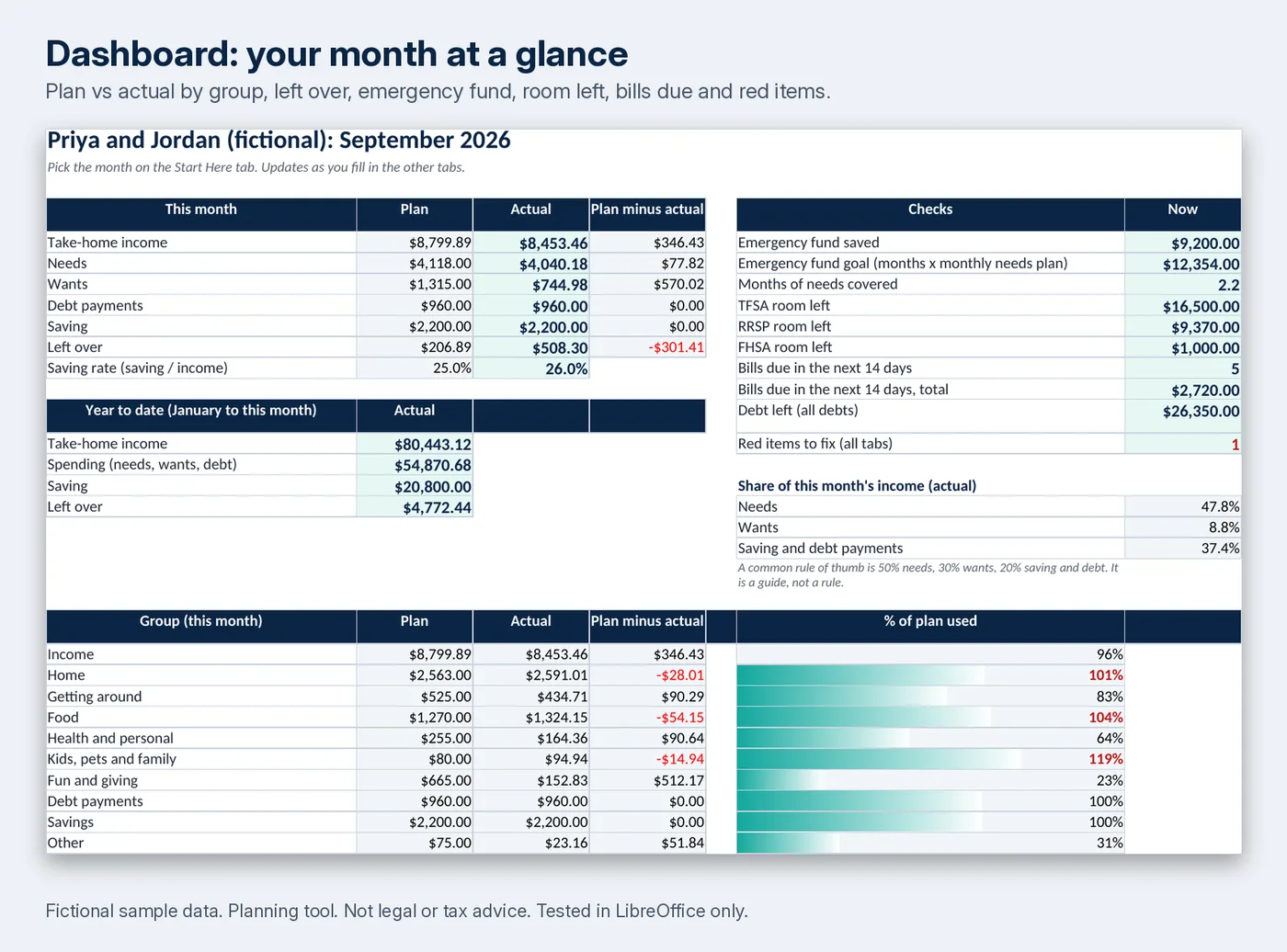
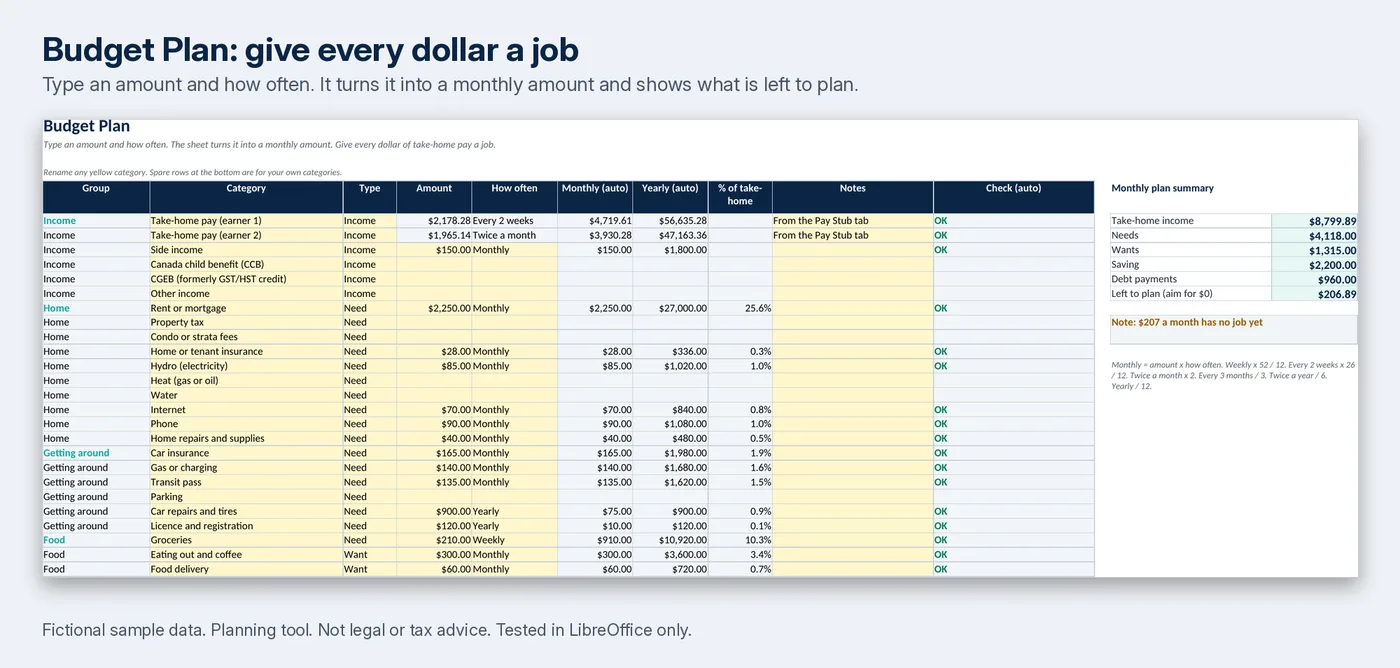
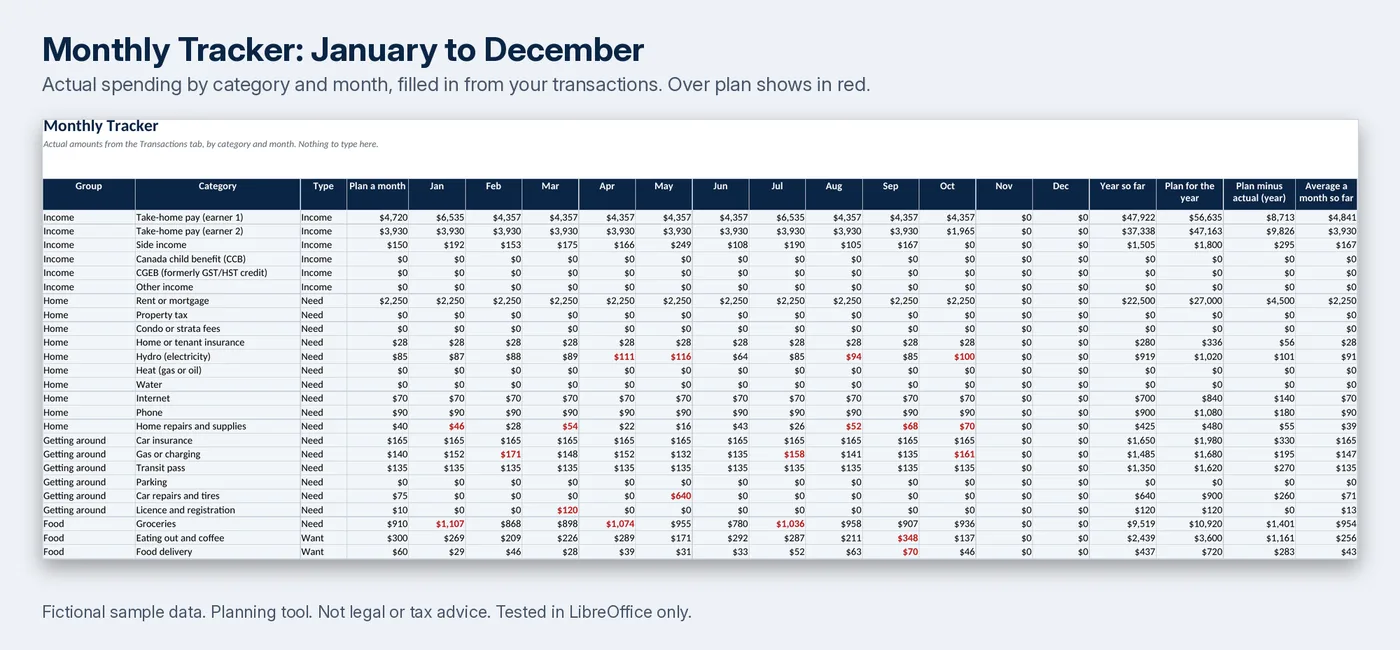
No. You paste or type your own transactions. The Transactions tab has room for up to 1,500 rows.
Yes. It is made for singles, couples and families with 1 or 2 earners, and the Pay Stub tab has room for up to 2 earners.
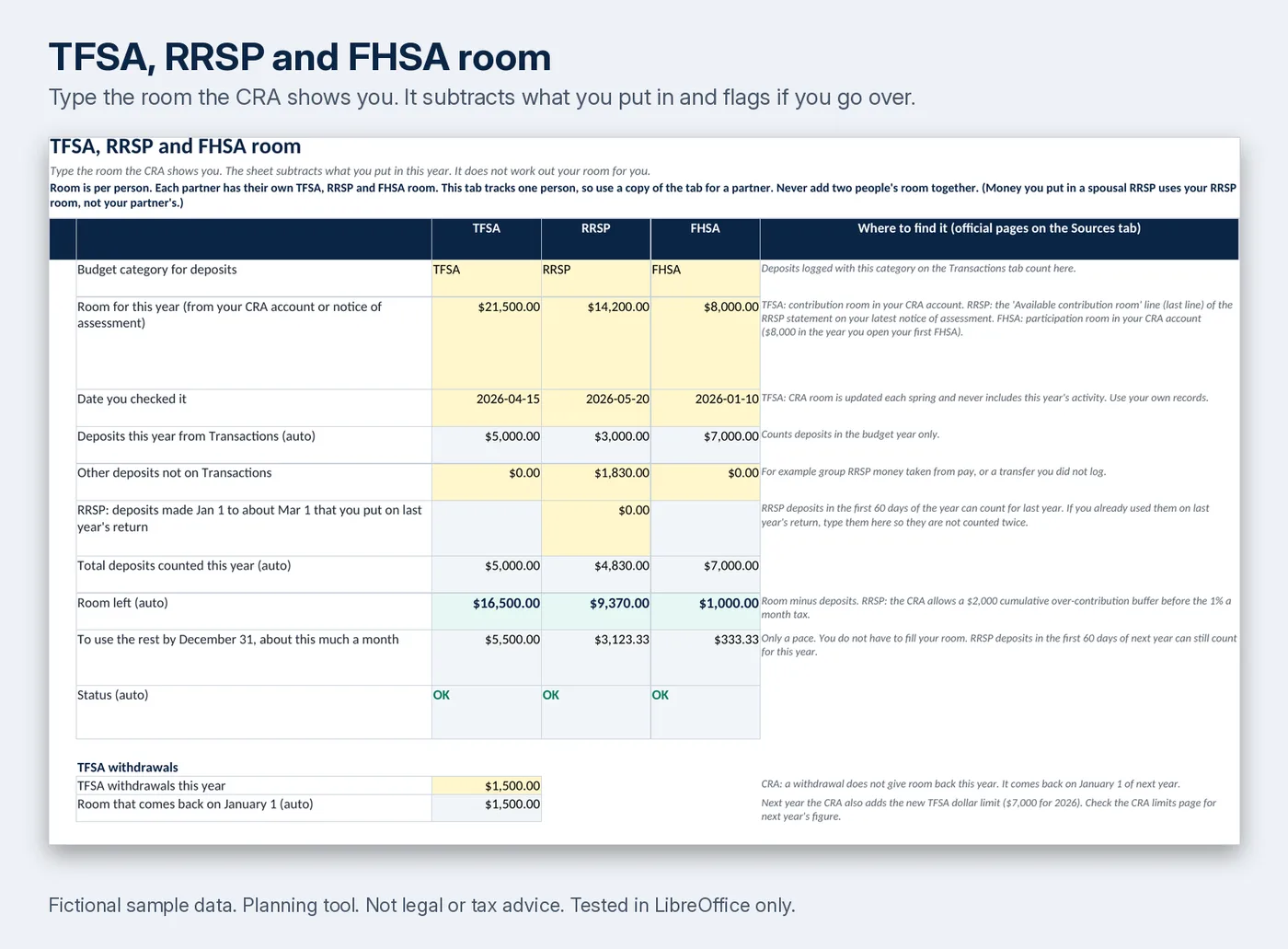
No. You type the room the CRA shows you. It subtracts what you put in and flags if you go over.
No. There is no place for your SIN or account numbers.
Yes. It is a spreadsheet workbook (.xlsx), with formulas only and no macros. Tested in Google Sheets and LibreOffice, not in Excel. In Google Sheets, the small progress bars on the Dashboard and Savings Goals tabs do not show, but every number is the same.
Yes. Get the free printable monthly budget worksheet, or read our free guide how to make a monthly budget in Canada.
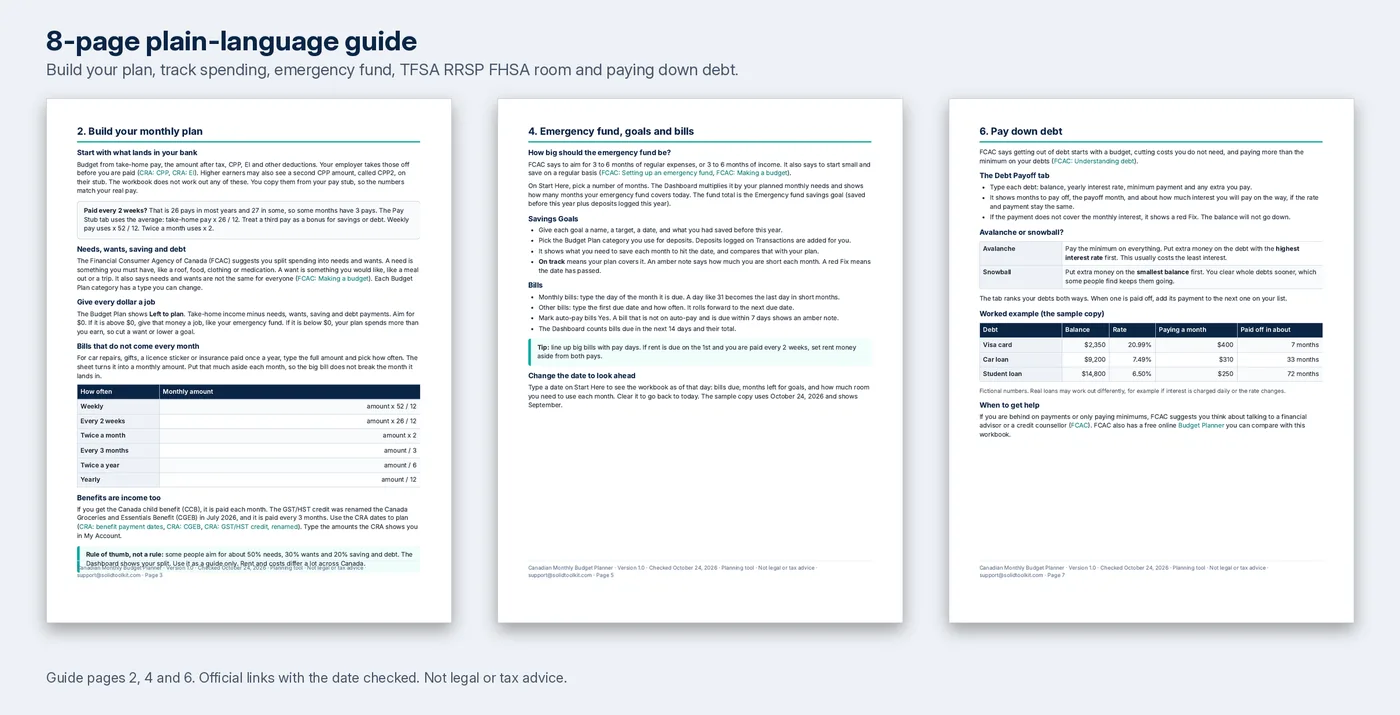
The Financial Consumer Agency of Canada (FCAC) says to start with your recent pay stubs, bills and account statements, and list your income, savings and expenses. It suggests you track everything you spend for 1 or 2 months and split your costs into needs and wants. Then compare your budget to what you actually spend at the end of each month. The Budget Plan, Transactions and Monthly Tracker tabs are built for those steps. Our free guide how to make a monthly budget in Canada walks you through it.
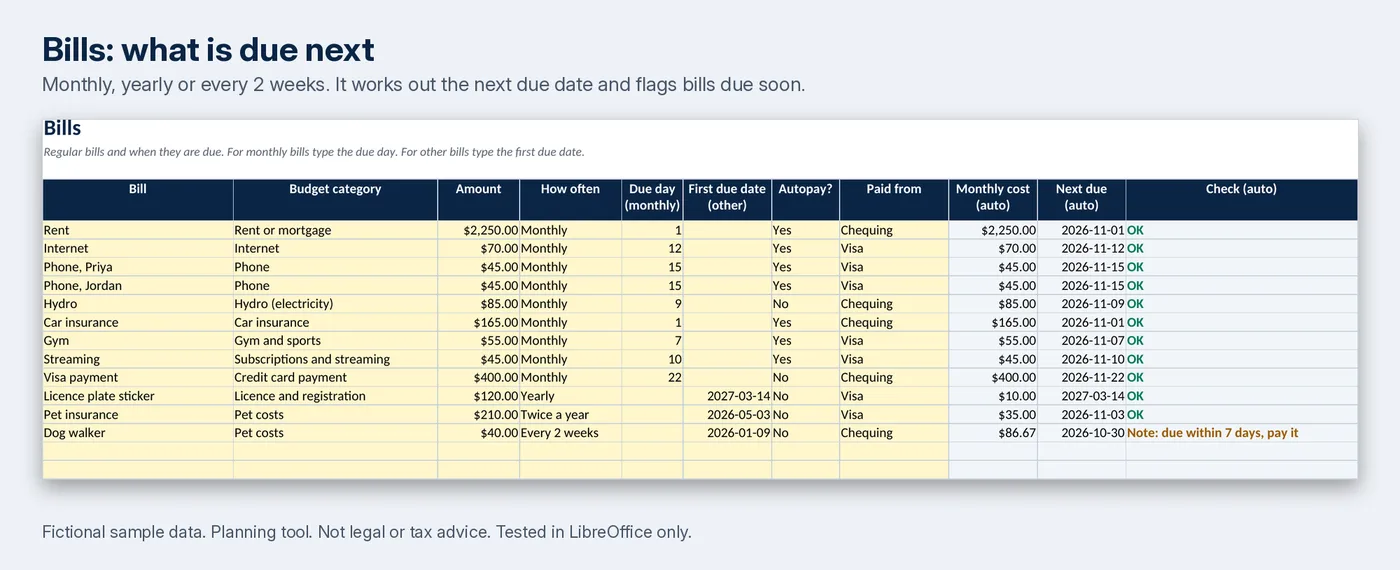
Every 2 weeks means 26 pays in most years and 27 in some. Most months have 2 pays, and 2 months a year have 3 (3 months in a 27-pay year). The Pay Stub tab uses the average: your take-home pay times 26, divided by 12. Our tip: treat a third pay as a bonus for savings or debt, and if rent is due on the 1st, set rent money aside from both pays.
Our tip: do not budget from your best month. Budget from a low month you can count on, pay yourself the same amount each month, and build a buffer in good months. Our free guide how to budget with irregular income shows how, step by step. In the kit, base your Budget Plan on that low month and log the money that comes in on the Transactions tab, so the Dashboard shows what is left over.
The FCAC says to aim for 3 to 6 months of your regular expenses, or 3 to 6 months of income. It also says to start with a small amount and save on a regular basis. On the Start Here tab you pick a number of months, and the Dashboard shows how many months your emergency fund covers today.
The CRA says to take the extra amount out as soon as possible, and not to wait for the CRA to tell you. Any excess amount in your TFSA is taxed at 1% per month for as long as it stays in your account. If you over-contribute on purpose, the CRA says there may be more tax consequences. You still need to file a TFSA return for the excess amount. The CRA also says to always check your room against your financial institution's records. The TFSA RRSP FHSA tab flags if you go over the room you typed.
No. The Budget Planner from the Financial Consumer Agency of Canada (FCAC) is an online tool. The FCAC says it allows you to create a personalized budget and save it online, and that you can compare your budget with those of other Canadians like you. Solid Toolkit made this kit. It is a spreadsheet you download, and it is not from the FCAC or the Government of Canada. Our tip: you can use both. Try the FCAC Budget Planner to see how you compare, then use this kit to plan and track each month.
Our view: it should follow the Canadian parts of your money, not just income minus spending. Pay every 2 weeks means 26 pays in most years and 27 in some. The CRA payment dates page lists a Canada child benefit payment in every month of 2026. The CRA says it sends the Canada Groceries and Essentials Benefit (CGEB, formerly the GST/HST credit) as quarterly payments, or as one payment in July if the amount per quarter is less than $50. It also says any excess amount in your TFSA is taxed at 1% per month for as long as it stays in your account. This kit follows pay every 2 weeks, the Canada child benefit and the CGEB, and the room you have left in your TFSA, RRSP and FHSA.
The FCAC suggests you keep all your receipts and bills, keep your spending to what is in your budget as much as you can, and update your budget with any changes, such as a pay raise or a bill increase. If your actual spending often differs from your budget, it says to adjust your figures to make the budget more realistic. It also suggests you set a reminder or book time in your calendar to look over your budget regularly. In the kit, the Monthly Tracker shows red when a category is more than 10% over its plan for the month, and the guide says to look at the Dashboard once a week and fix anything red.
The FCAC says a need is something that is necessary, required or essential, such as a roof over your head, clothing, food or medication. A want is something you would like but do not necessarily need, such as meals at a restaurant, a trip or a gym membership. It also says needs and wants are not the same for everyone, and they may change over time. In the kit, each Budget Plan category has a type you can change, and the Dashboard shows your needs and wants share.
The FCAC and CRA facts in the answers above and the benefit facts in The problem use these official pages.
CA$15, one-time. Instant download.
Open the kit and use it for 14 days. If it does not fit, email support@solidtoolkit.com and we refund the full price you paid for the kit. No reason needed. If something in the kit is wrong or does not work, we will fix it and send you the fixed file, or refund you if you prefer. Read the full refund policy.